UltraEdit PowerTips
Use UltraEdit to compile Java
Can you use UltraEdit to compile Java code?
The answer: YES!. UltraEdit does not have an embedded compiler, however, you can configure a tool which will pass your code to the Java Compiler.
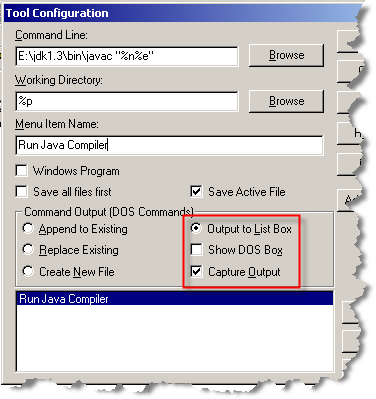
To configure the Java Compiler you will need to use the following information:
Command Line: “ E:\jdk1.3\bin\javac “%n%e” “
Working Directory: “%p“
Menu Item Name: “Run Java Compiler“
Command Output (DOS Commands): “Output to List Box and Capture Output“
Java Compiler Tool
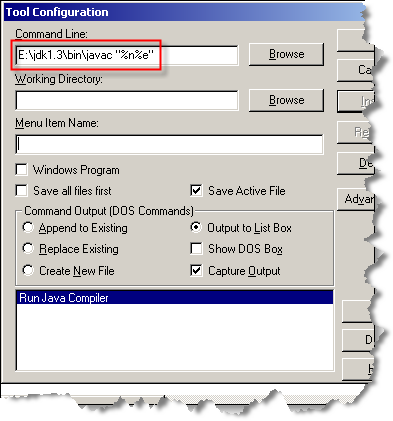
Step 1: Command Line (File Name and Extension)
In the Command line field type: E:\jdk1.3\bin\javac “%n%e”
- E:\jdk1.3\bin\javac – Path to Java Compiler
- “%n” – fileName only (“test”)
- “%e” – Extension only (“.c”)
Step 2: Working Directory
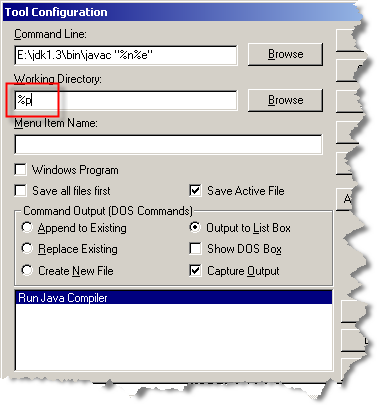
In the Working Directory field type: %p
- %P – Path of file ex. (“C:\project\test\”)
- Please note: the %p cannot be enclosed with quotes.
Step 3: Menu Item Name
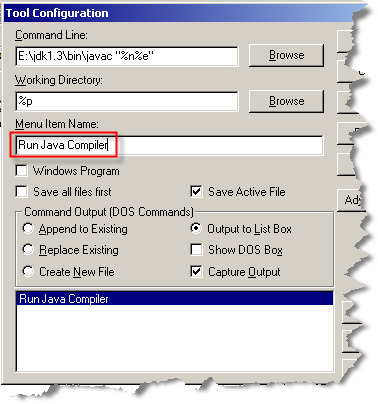
In the Menu Item Name field type: “Run Java Compiler“
- Please note: This may be whatever you would like to name your tool.
Step 4: Command Output (DOS Commands)
In the Command Output section select the following options: “Output to List Box” and “Capture Output“.
Step 5: You’re Done
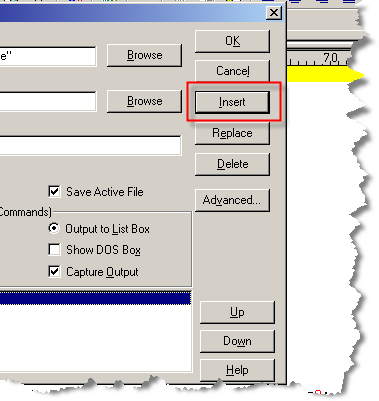
After completing the above steps click on the”Insert” button and your custom tool will be added.
Now that you are done, click “OK”.