UltraEdit PowerTips
Using SSH/Telnet
Since UltraEdit and UEStudio have an embedded SSH/Telnet Console, now you can perform your command line executions from the dockable SSH/Telnet terminal!
Using the SSH/Telnet Console
You can enable the SSH/Telnet in View : View/Lists : SSH/Telnet Console
The console is dockable/undockable – you can place it where you would most prefer it.
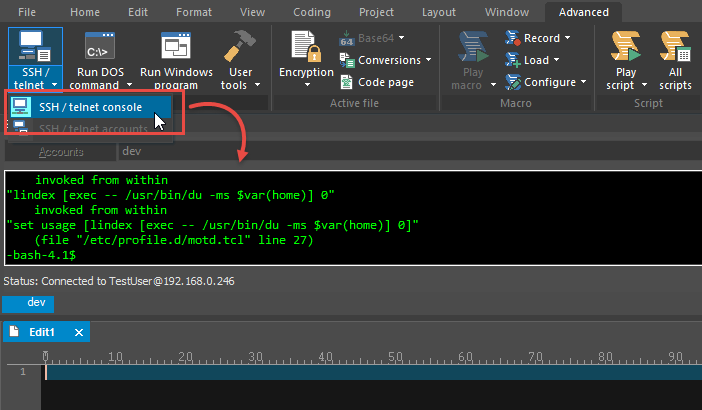
Click on the accounts button, the SSH/Telnet Account manager will open.
This dialog is what you will use to configure the accounts.
Click the Add Account button, then specify a new account name.
The SSH/Telnet Account Manager has options organized under five different tabs: General, Advanced, Proxy, Authentication and Terminal.
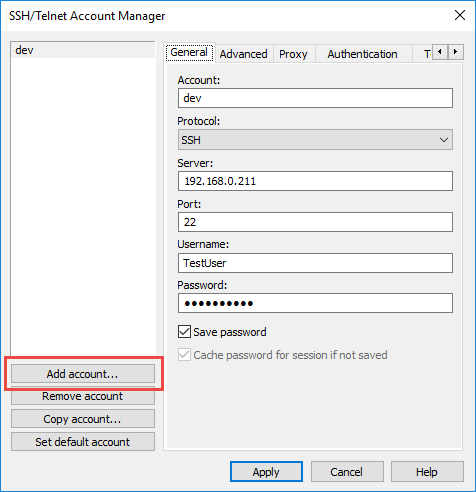
3a. The General Tab:
Account:
The name to be used for the account. This is the name which will appear in the list to the left of the configuration options.
Protocol:
Select either SSH or Telnet protocol be used for the account.
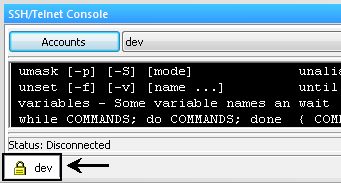
If SSH is selected, UltraEdit/UEStudio will only connect with the SECURE SHELL protocol. All transfers are encrypted, and the encryption algorithm is negotiated with the server. If this is set, the terminal tab will show a “lock” symbol indicating the transfer is secure.
Server:
This is the server that you will connect to, such as ultraedit.com. If you prefer, you can use the IP Address in the form of xxxx.xxxx.xxxx.xxxx.
Port:
This is the port used by UltraEdit/UEStudio for the SSH/Telnet protocol. The default is 22 for SSH and 23 for Telnet. You can also change this if the server uses a different port.
Username:
This is the username used to log into the server.
Password:
This is the password used with the username to log into the server. This should be the password for the username as provided by the site administrator.
Save Password:
This checkbox determines if UltraEdit/UEStudio will save the password. If not, the user will be prompted for the password as required.
Note: If the password is saved it is encrypted and stored on the system.
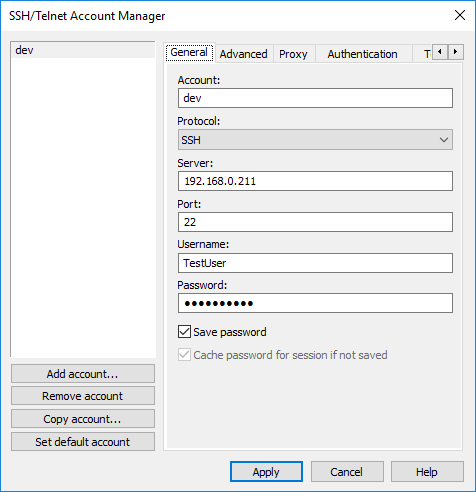
3b. The Advanced Tab:
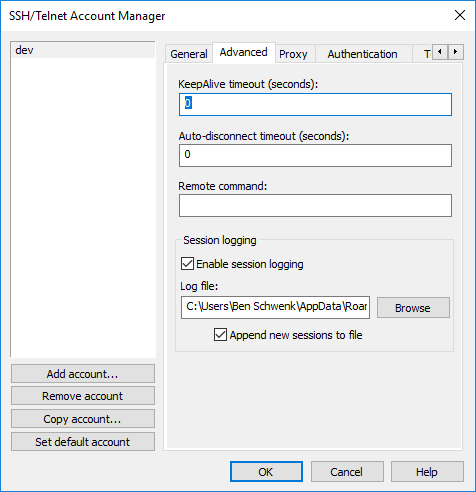
KeepAlive Timeout:
This specifies the interval (in seconds) at which connection test packets should be sent to the server.
Auto-Disconnect Timeout:
This specifies the interval (in seconds) that UltraEdit-32/UEStudio should wait before terminating a session that has had no activity.
Remote Command:
This may be used to specify a command which will be executed automatically upon successful completion. After the command has been executed the terminal session will be automatically disconnected.
3c. The Proxy Tab:
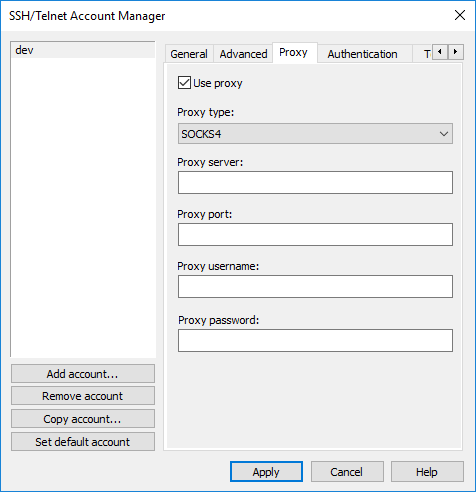
Use Proxy:
If checked, this enables the proxy settings configuration and configures this account to connect through the specified proxy. If you are connecting directly to the Internet without using a proxy, the proxy settings should not be enabled. If you are connecting through a proxy on a LAN you will need to set up the proxy settings.
Proxy Type:
This is the proxy type to be used for the SSH/Telnet account. You may select one of the following proxy types:
- HTTP – (CONNECT)
- Relay
- SOCKS4
- SOCKS5
- Windows – (Internet Explorer)
Proxy Port:
This is the port used by UltraEdit/UEStudio for the SSH/Telnet protocol. The default is 22 for SSH and 23 for Telnet. This may be changed if needed.
Proxy Username:
This is the username used to log into the proxy.
Proxy Password:
This is the password to log into the proxy. This is the password, for the username, as provided by the site administrators.
3d. The Authentication Tab:
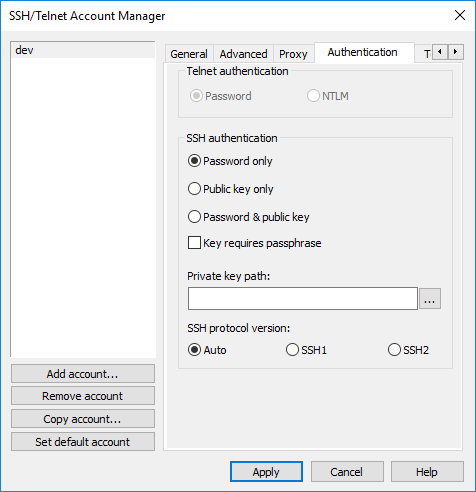
Authentication:
This allows the user to specify the protocol and type of authentication to be used with the server.
The following protocols are supported:
Auto:
If this option is selected connection will first be attempted with SSH2. If this is not supported by the server SSH1 will be used for the connection.
SSH1:
If this option is specified ONLY SSH1 will be used to connect to the server.
SSH2:
If this option is specified ONLY SSH2 will be used to connect to the server.
The following authentication types are supported:
Password Only:
This requires the username/password to be provided and no public/private key pair is used.
Public Key Only:
This requires the use of the public/private key pair to be used. The private key location must be specified in the Private Key Path.
Password and Public Key:
This allows the user to specify the public/private key and/or the username/password.
Key Requires Passphrase:
This allows the user to indicate that the private key is password protected. If this is the case, the user will be prompted for the password once per session, or after changing the account settings.
Private Key Path:
The user may browse to or manually specify the path to the existing private key. The authentication method must be supported by the server. The keys used should be in OpenSSH format and may be RSA or DSA type keys.
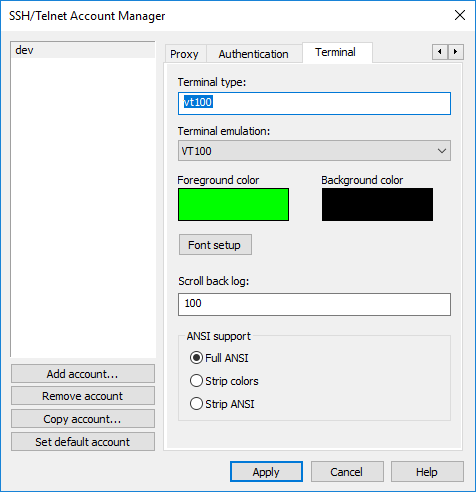
3e. The Terminal Tab:
Terminal Type:
This option is used to specify the terminal type set on the remote server (an Environment variable). This may be left blank.
Terminal Emulation:
This dropdown allows the user to specify what terminal emulation should be used for the session. The following options are supported:
- VT100
- Linux
- None
Foreground Color:
You may click on the color block to specify the foreground color for the terminal.
Background Color:
You may click on the color block to specify the background color for the terminal.
Font Setup:
Clicking on this button will present the standard Windows font dialog from which you may select the font to be used.
Scroll Back Log:
Use this field to specify the number of lines you may scroll back in the existing log.
ANSI Support:
When a connection is established with the server, escape sequences are passed with data specifying color, style, and other formatting information. This setting allows you to specify what formatting information is displayed in the SSH/Telnet client window.
Full ANSI:
If this option is selected the client will attempt to display everything.
Strip Colors:
If this option is selected the client will attempt to display everything except colors passed by the server.
Strip ANSI:
If this option is selected the client will only attempt to display text and whitespace characters passed by the server.
UltraEdit-32/UEStudio will allow you to copy an existing account with the Copy Account button.
As you’ve probably guessed, the Remove Account button will remove the active/selected account from the accounts list.
6. Set Default Account
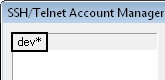
The Set Default Account button sets the active/selected account as the default account specified by an asterisk “*” following the account name in the list.
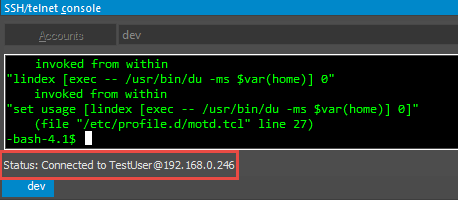
Once you’ve properly set up the account, click connect. You should see the “Status” changed to “Connected To…”.
Copy
You can copy text using the right-click context menu, or using CTRL+INSERT.
Paste
You can paste text using the right-click context menu, or using SHIFT+INSERT.

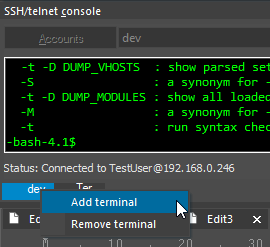
You can open additional terminal windows, and switch between them, using the Tabs at the bottom of the console. To Add or Remove a terminal right click on the existing tab.