Remove blank lines from text file
A question which users frequently have is: “I have a lot of blank lines in my file and I don’t want to go through and manually delete them. Is there an easier way to do this?”
How to Remove Blank Lines
The answer: YES!
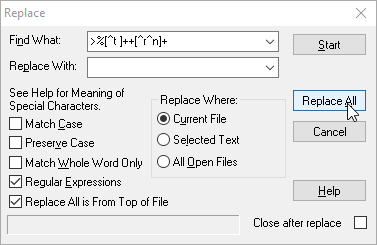
Starting with UltraEdit v24.20 (and UEStudio v17.20), there are a couple of options for deleting all blank lines from a text file in the Edit » Delete drop down:
These options work as follows:
Delete all empty lines
This will delete all lines in the file that contain no characters or whitespace. If text is selected, then the operation is restricted only to the selected text.
Delete all empty and whitespace-only lines
This will delete all lines in the file that contain no non-whitespace characters. This means that lines containing literally nothing are deleted as well as lines containing only spaces and/or tabs. Again, if text is selected, then this operation is restricted only to the selected text.
But I don’t have this version (or I just like making things complicated)… How can I delete all blank lines?
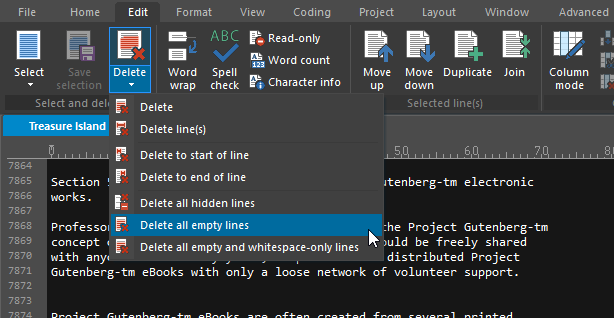
Well, beside the fact that you should consider upgrading to get this functionality in a single click, in previous versions of UltraEdit where Perl regular expressions are supported, you can use the following Perl regex to delete all blank lines in your text file. Enable Perl regular expressions by clicking the gear button in the Find dialog to show the advanced search options, or prior to UltraEdit v14.00 enable “Perl compatible Regular Expressions” under Advanced » Configuration » Search » Regular Expression Engine.
Find What: “^(?:[\t ]*(?:\r?\n|\r))+” (without the quotes)
Replace With: “” (without the quotes – i.e., nothing).
Note: Click Replace all once to replace all – even consecutive – blank lines in a text file.
I’m using an even older version that doesn’t support Perl regex…do you have a solution for me?
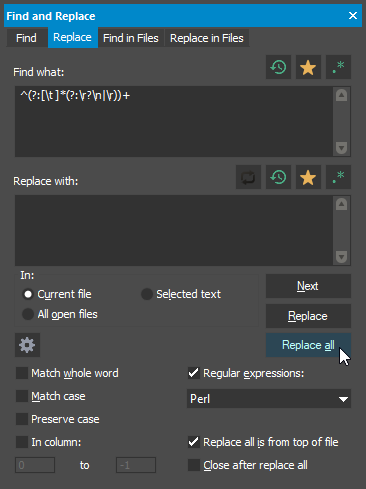
Did we mention that you should really consider upgrading? Anyway, if you’re using a previous version of UltraEdit that doesn’t support Perl regex, to delete blank lines you can use a regular expression replace as follows. You’ll need to check the Regular expressions option in the Replace dialog.
Find What: “%[^t ]++[^r^n]+” (without the quotes)
Replace With: “” (without the quotes – i.e. nothing).
You might need to click Replace all several times to ensure all blank lines are removed. Because of the way the the older regular expression syntax works, the replace might not replace all consecutive blank lines in your text file.