









We know our macOS users have been waiting for more attention on these platforms. UltraEdit for Windows has traditionally been the most mature version of the product, and we know there is still work to do to bring the macOS experience closer to that level.
UltraEdit 2025.0 for macOS is an important step in that direction.
This release is focused on stability, reliability, performance, and the core editing experience. You’ll find lower CPU usage in specific editing scenarios, fewer interruptions, better handling of multi-file workflows, improved terminal compatibility, more predictable search and replace behavior, and a range of UI and platform-specific refinements. It is not the final step. But it is a meaningful one.
Let’s take a closer look at what’s new in UltraEdit 2025.0 for macOS.
Better stability and lower CPU usage
One of the biggest areas of improvement in UltraEdit 2025.0 is stability.
This release includes fixes for repeated crashes while editing on macOS, crashes when modifying settings, crashes related to wordfile paths, and startup crashes with certain configurations.
We also addressed a hang that could lead to 100% CPU usage while editing. In affected scenarios, CPU usage has been reduced by at least 50%, helping UltraEdit feel more stable and responsive during longer editing sessions.
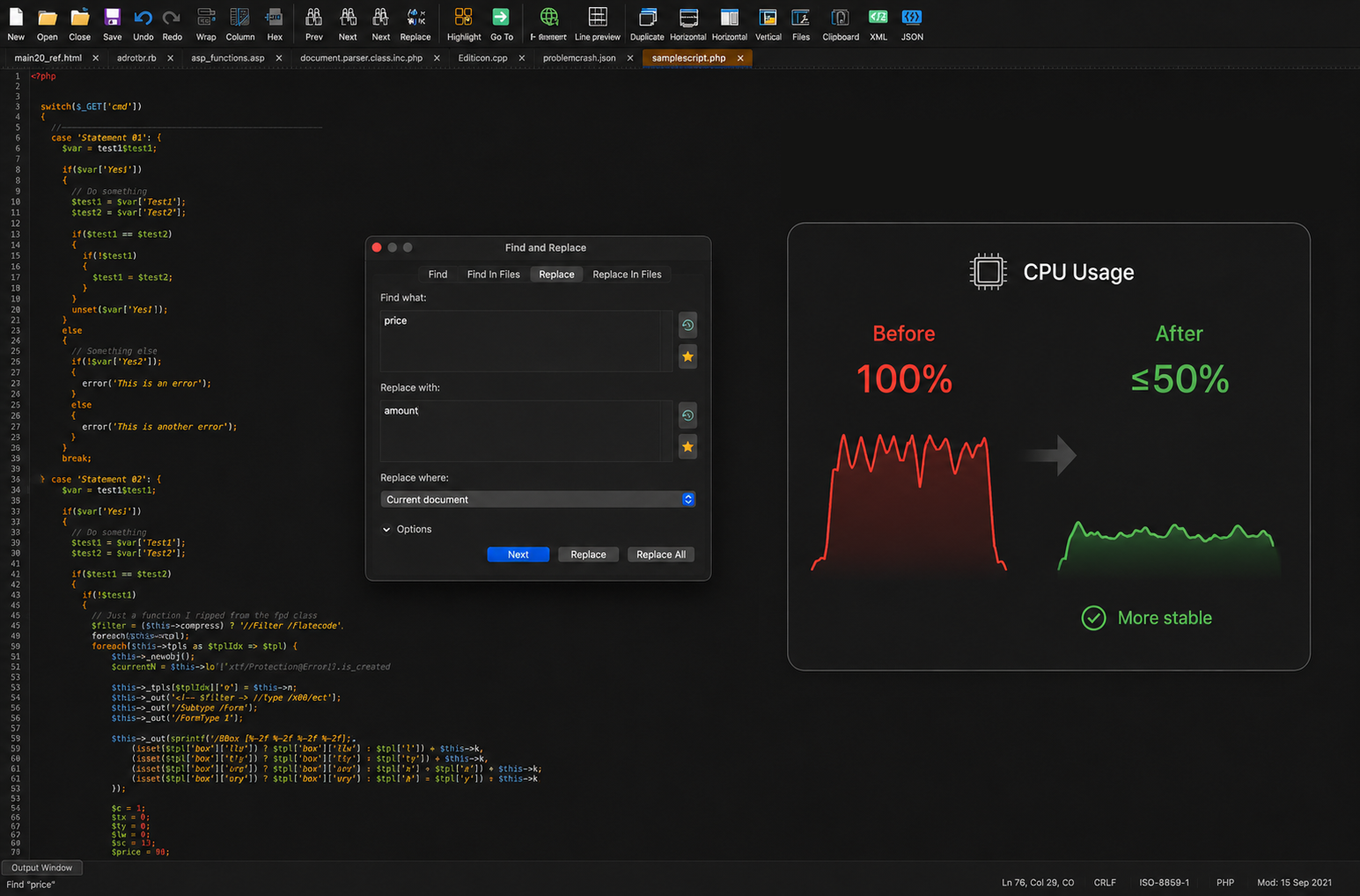
This release also improves behavior around multi-file workflows, including a hang that could happen when working with multiple open files, invoking New Window, and closing windows.
If you use UltraEdit for larger editing sessions, longer-running work, or multiple open files, these improvements should make the experience feel smoother and more dependable.
Smoother everyday editing behavior
UltraEdit 2025.0 also includes several improvements to the core editing experience on macOS.
These are the kinds of updates that make daily work feel more predictable: how navigation behaves, how selections work, how files are detected, how dialogs respond, and how UltraEdit handles specific characters and editing modes.
This release includes improvements such as:
-
- Better arrow key navigation at file boundaries while editing
- Improved detection of files that are already open
- Improved behavior when replacing “En space” characters in ASCII and hex mode
- Improved undo behavior in hex mode
- Improved Replace All behavior for umlauted characters in UTF-8 files
- Improved regular expression behavior where “Perl” was sometimes not shown as an option
- Improved double-click selection behavior for quoted strings and strings containing $ and >
- Improved behavior when switching from hex mode back to normal edit mode
- Fixed a spelling issue in the Hex Find/Replace dialog
Together, these changes help make UltraEdit feel more consistent across the editing workflows you use every day.
Better file tabs and multi-file workflows
This release also improves how UltraEdit behaves when working with multiple files and tabs.
If you often keep many files open at once, you’ll notice improvements around tab sorting, multiline tabs, file detection, and unexpected tab behavior.
UltraEdit 2025.0 adds Sort File Tabs to the list of commands that can be added to the toolbar, giving you quicker access to tab organization.
It also includes fixes for:
-
- Multiline tabs behaving unexpectedly when a new file forces a second row of tabs
- Screen splits appearing unexpectedly when clicking one of several open file tabs
- Blank edit files being created unexpectedly after clicking through the tab bar row
- Favorite Files dialog sizing and resizing behavior
- UltraEdit creating Edit files in the user’s home directory when it should not
- UltraEdit appending .s to newly created files saved with a .sql extension
The goal is to make multi-file work feel cleaner, especially when your editing session starts to grow.
More flexible commands, toolbars, and project files
UltraEdit 2025.0 adds a few useful workflow improvements for users who customize their setup or move between systems.
On macOS, you can now move custom toolbars above the edit window, giving you more flexibility in how your workspace is arranged.
This release also adds support for specifying line and column position from the command line, which is useful when opening files directly at a specific location.
Project files are now more portable, too. They can be created on one system and moved to another more easily, helping users who work across machines or environments.
JSON, live preview, and markdown refinements
UltraEdit 2025.0 also improves several content-specific editing workflows.
You can now use Reformat JSON and Compress JSON on files even when JSON syntax highlighting has not been applied. This makes JSON cleanup easier when working with files that contain JSON-like content but are not formally detected or highlighted as JSON.
For markdown users, this release includes improvements to bold text highlighting and live preview behavior, including cases where live preview did not display content as expected or rendered incorrectly after adding and saving a blank line.
These updates help make UltraEdit more dependable for structured content, documentation, markdown files, and JSON cleanup.
macOS-specific improvements
UltraEdit 2025.0 includes several refinements specifically for macOS users.
The release adds support for macOS dictation and transcription, making it easier to use system-level input features inside UltraEdit.
It also improves several macOS application behavior issues, including:
-
- UltraEdit not coming to the foreground when its icon is clicked in the menu bar
- UltraEdit not remembering the desktop it is assigned to
- UltraEdit not adjusting size when Mission Control is invoked
- Crashes when modifying settings on macOS
- Support for moving custom toolbars above the edit window
These changes are part of making UltraEdit feel more natural and reliable on macOS.
An important step for macOS
UltraEdit 2025.0 for macOS is focused on the things that matter most for these platforms right now: stability, reliability, performance, and smoother everyday editing. We know there is still work to do. This release does not close every gap between Windows and macOS, but it does represent a clear step forward.
With lower CPU usage in affected scenarios, improved editing stability, better multi-file behavior, stronger terminal compatibility, more predictable search and replace behavior, and platform-specific refinements for macOS, UltraEdit 2025.0 gives you a more dependable experience across both platforms. And it is just the beginning of our renewed focus on making UltraEdit better across every operating system you use.
Download UltraEdit 2025.0 for macOS
UltraEdit 2025.0 for macOS is available now.
Update today to get the latest stability, performance, editing, terminal, toolbar, and platform-specific improvements.




0 Comments