








There are various text editors available on the market today. However, a tool that enables typing and saving code or text does not necessarily mean it will fulfill all of a user’s requirements.
For instance, online text editors have gained increasing popularity during the past several years due to their accessibility and no-cost usage. They are excellent starter tools for users who need basic text editing functions.
The functionality of online tools becomes inadequate when users need to work on large projects, edit large files, or maintain data security. While online editors are convenient for light tasks, they can run into performance or feature limitations when handling larger projects or more demanding use cases.
Offline text editors demonstrate superior performance compared to their online counterparts, as they provide faster processing, support for large files, and stable functionality without relying on browser limitations.
The UltraEdit text editor, along with other similar tools, provides high-performance features like large file handling, multi-caret editing, column mode, and robust customization—making it well-suited for professional and enterprise-level work. The correct offline text editor selection benefits developers, system administrators, and technical writers by saving time and reducing their work-related stress.
This article examines the differences between online and offline text editors and explains why offline text editors often have better functionality.
Cost: Free vs Paid software
You will find many free options when you search for online text editors. They include EditPad, Replit, as well as online notepads and basic browser-based code editors. These tools provide simple functionality without requiring any payment. These text editors are suitable for basic editing needs and quick note-taking purposes.
Free tools are great for quick tasks, but their limits can become clear when projects grow in complexity or size.
That’s because free tools often come with trade-offs. Free tools restrict users from opening large files that exceed specific size limits. The tools have simpler programming language support for users. Some may have limited support for multiple languages or lack features like project management, syntax-aware editing, and automation capabilities.
In addition, free editors often rely on advertising or data collection to generate revenue. This can slow down performance or introduce concerns around privacy and control over your content.
That’s where paid offline editors like UltraEdit come in—not as replacements, but as powerful companions when you need to go beyond the basics. Tools like UltraEdit offer complete workflow management, deep language support, and advanced features that help streamline complex tasks. It’s an investment in performance, reliability, and a smoother editing experience.
Want to dig deeper into the trade-offs of using free tools? Check out this article on the hidden downsides of free and open-source software.

The UltraEdit offline text editor
Security and privacy
Editing private documents or source code requires absolute security measures. The cloud-based storage of many online text editors requires your files to travel across the internet before they sit on servers owned by others. Even if you trust the service provider, your data is more at risk because a third-party provider is less secure than just having all your files saved locally.
Online tools can be secure, but they rely on third-party servers. For users who prioritize full data control—especially in sensitive environments like finance, healthcare, or government—offline editors offer peace of mind.
Your files and data could be exposed when there is a data breach, weak encryption, or system bugs occur. The exposure of data poses serious risks to businesses regarding leaks, compliance issues, and legal problems. The main risk for individuals is that their work could be exposed to people they didn’t intend to share it with.
Offline editors like UltraEdit give users full control over where and how files are stored. With no reliance on internet access, there’s no concern about unauthorized cloud access or background syncing.
UltraEdit also includes enterprise-grade security and compliance features, making it a trusted option for professionals who deal with sensitive or confidential data.
Want to learn more about how UltraEdit keeps your work safe? Read about its Enterprise Security and Compliance features.
When privacy is a top priority, going offline is often the smartest choice.
Configurability and features
The main reason developers and professionals select offline text editors is that they can customize their workspace. Some online editors are improving with plugins and AI. But if you need full control over layout, tools, and automation, offline editors like UltraEdit remain ahead.
UltraEdit goes beyond basic typing. This offline text editor offers advanced workspace customization, including dockable and reorganizable windows that let you tailor your layout to match your workflow. You also get support for macros—custom shortcuts that automate repetitive tasks and save time. Add to that support for plugins, themes, and custom layouts, and you have a tool that fits your exact needs.
Learn more with UltraEdit Power Tips.

UltraEdit Interface
Online editors, while convenient, often lack this level of flexibility. Many run in browsers with limited access to your system, which means fewer extensions, fewer keyboard shortcuts, and limited power for large-scale tasks. They’re built for light editing, not complex workflows.
You may have noticed online editors are adding flashy features like AI code suggestions or real-time collaboration. These are useful, but powerful offline editors can also integrate AI tools and even go further. With UltraEdit, you can work side-by-side with AI, but still keep full control over your data and setup.
Plus, offline editors often support advanced tools like column mode editing, file comparison, project management, and even binary/hex editing. These features are essential for professionals who work with big files or complex systems.
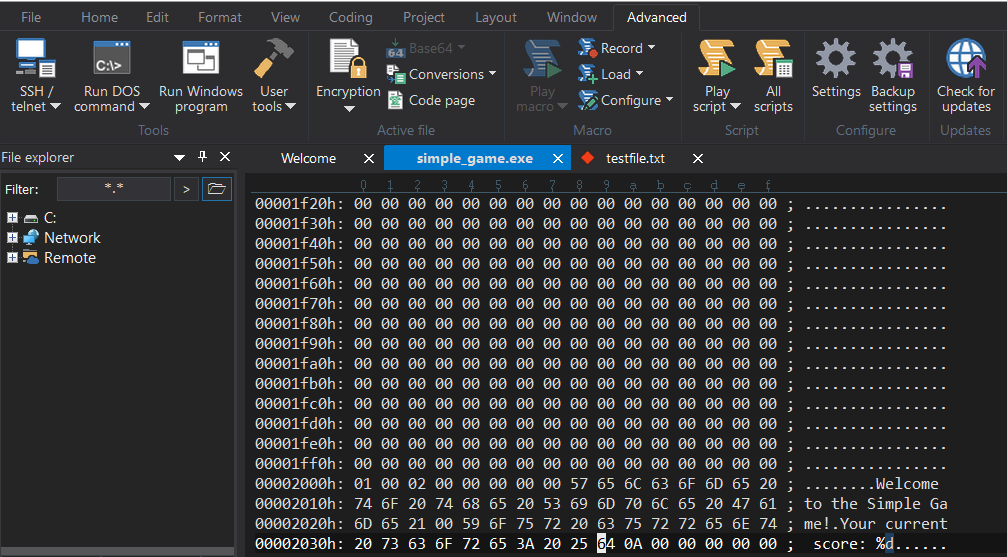
Hex Editing in UltraEdit
In short, if you want a text editor that grows with your skills and adapts to your work style, offline options like UltraEdit are hard to beat.
Performance and file handling
Online text editors tend to slow down or crash when users attempt to open large files through their platforms. Most online tools lack the capacity to handle heavy workloads because of their design limitations. The tools depend on browser resources and internet connectivity, which restricts their simultaneous data processing capacity.
Offline editors, on the other hand, are designed for performance.
UltraEdit stands out because it efficiently handles large files that exceed 10GB in size. The application maintains its speed and responsiveness when users edit large log files, work with data exports, and perform binary editing tasks. The application maintains its functionality without freezing, lagging, or collapsing when faced with demanding situations.
The advanced capabilities of offline editors transform the daily work of developers, analysts, and system administrators who handle big and complicated files. The system provides smooth scrolling, searching, and editing capabilities without any crashes or delays.
Offline editors access your computer’s entire processing power beyond what browsers normally permit. The system delivers faster loading speeds and quicker search results, providing an enhanced user experience.
An offline editor like UltraEdit provides the necessary speed and power for tasks that require performance, as it eliminates frustrating delays.
Use case scenarios
Both online and offline editors have their strengths. Below are some use cases where each type excels.
Use cases where offline editors shine
- A developer editing 1GB of log files
Most online editors struggle with large files. They lag, freeze, or crash altogether. But UltraEdit is designed as an offline text editing tool to handle huge files, whether it’s a 1GB log or a massive data dump. You can scroll, search, and edit without delays, making it ideal for developers who deal with big data.
- A security-conscious company editing code locally
Companies that work with sensitive data, like healthcare, finance, or government sectors, can’t risk storing files in the cloud. With UltraEdit, files stay on the local machine, giving full control and peace of mind. It’s also compliant with enterprise-level security standards.
- A remote developer needing uninterrupted access
When working remotely, internet issues can bring online editors to a halt. An offline tool like UltraEdit doesn’t depend on a connection. You can code, edit, and save no matter where you are—on a plane, in a rural area, or during a network outage.
In all these cases, offline wins.
When online text editors are the better fit
- Quick edits on the go
Need to make a fast change or jot down notes from a borrowed device? Online editors let you start editing instantly—no setup or downloads required.
- Team collaboration in real time
Online editors like Replit allow multiple users to work on the same document or code file simultaneously, making them great for pair programming or group edits.
- Lightweight tasks on any device
For simple text editing, such as tweaking a config file or reviewing short code snippets, online tools are perfect, especially when you’re working across multiple devices or operating systems.
Online vs offline text editors: quick comparison
Let’s look at the comparison of these text editors in a summarized table.
| Feature | Online Text Editors | Offline Text Editors (e.g., UltraEdit) |
|---|---|---|
| Access & Convenience | Accessible from any browser | Requires installation, but runs locally |
| Cost | Usually free | Paid, with premium features and support |
| Security & Privacy | Cloud-based, risk of data exposure | Local storage, full control over files |
| Configurability | Limited customization | Highly configurable (macros, extensions, themes) |
| Performance | Slows down with large files | Handles large and complex files smoothly |
| Advanced Features | Basic editing, some AI features | Rich tools like dockable and reorganizable windows, binary editing, and macros |
| Reliability | Depends on the internet and the browser | Stable and consistent, even offline |
| Use Cases | Best for light editing or collaboration | Ideal for coding, secure work, and large-scale editing |
Conclusion & recommendation
The modern workflow requires both online and offline text editors to function effectively. The speed and accessibility of online editors, combined with real-time collaboration features, make them suitable for quick tasks and lightweight editing across devices. Offline tools become necessary when your work demands additional power, privacy, and flexibility.
UltraEdit and similar offline editors exist to deliver high-performance functionality. The tools offer strong features and complete file management capabilities, as well as workspace control through browser-independent offline operation. Offline editors like UltraEdit provide essential functionality for tasks involving large log files and secure code editing ,and secure work environments.
You don’t have to choose just one. Online tools have their limitations, so UltraEdit serves as your primary tool for specific situations.
Ready to try it for yourself?
Download a free trial of UltraEdit and experience the difference a professional-grade text editor can make.



0 Comments